

Overview (Home Screen)
Pools
Designed to display the status and connection statistics of a mining device to mining pools.
This section displays information about each configured pool, its activity, and connection quality.
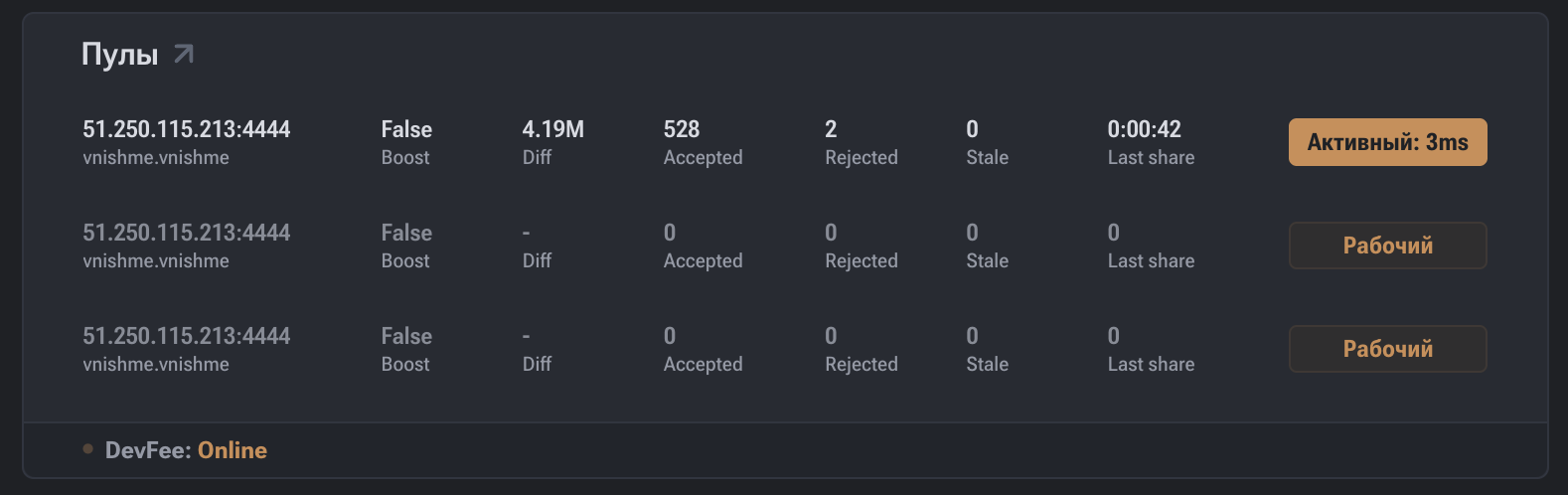
Displayed Parameters
- Pool URL — The address of the mining pool to which the device is connected.
- Status — The current connection status to the pool (active / backup).
- Diff (Difficulty) — The difficulty of shares issued by the pool.
- Accepted — The number of shares successfully accepted by the pool.
- Rejected — The number of rejected shares.
- Stale — The number of stale shares.
- Last share — Time since the last share was sent.
- Latency / Active — Connection latency to the pool (ms).
- Boost — Status of accelerated operation mode (if supported).
Data Interpretation
- A high Accepted value indicates stable and correct miner operation.
- Elevated Rejected or Stale values may indicate:
- network delays;
- unstable internet connection;
- incorrect pool or equipment settings.
- Last share allows real-time assessment of mining activity.
Practical Significance
The pools section is used for:
- Monitoring connections to primary and backup pools;
- Diagnosing network issues;
- Assessing pool performance;
- Analyzing the stability of share submission.
Pool Priority
- The first pool in the list is the primary one.
- If the primary pool is unavailable, the device automatically switches to the backup pool.
- The active pool is indicated by its corresponding status.