

Overview (Home Screen)
Cooling
Designed for monitoring the status and operation of the mining device's cooling system. Displays information about fans, their speed, and current status.
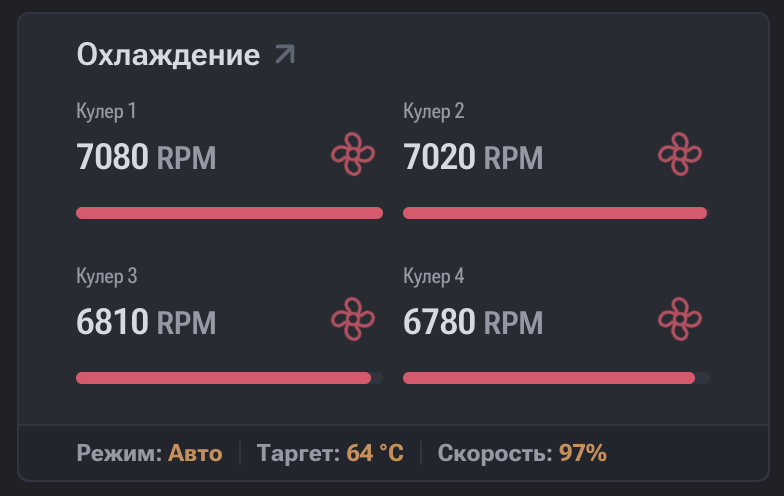
Displayed Parameters
- Fan number — fan identifier (Fan 1, Fan 2, etc.).
- RPM (Revolutions Per Minute) — fan rotation speed in revolutions per minute.
- Fan Duty (%) — fan load level in percentage.
- Status — current fan status:
- OK / Active — the fan is operating correctly;
- Error — the fan is unresponsive or operating incorrectly;
- Stopped / Disabled — the fan is stopped or disabled (if supported).
Data Interpretation
- Stable RPM and Fan Duty values indicate correct operation of the cooling system.
- Absence of RPM or an Error status means the system is not receiving correct data from the fan.
- Increased Fan Duty at a stable temperature may indicate an aggressive cooling profile.
Practical Significance
The cooling section is used for:
- Monitoring cooling efficiency;
- Preventing ASIC device overheating;
- Diagnosing faulty or disconnected fans;
- Analyzing the cooling system's reaction to temperature changes.
Impact on Device Operation
Incorrect fan operation can lead to:
- Increased chip temperature;
- Reduced performance (throttling);
- Automatic mining shutdown to protect the hardware.
Recommended Actions for Fan Error
If an Error status is detected, it is recommended to:
- Check the physical connection of the fan.
- Ensure there is no mechanical damage.
- Check cables and connectors.
- Restart the device.
- Replace the fan in case of hardware malfunction.
Pools
Designed to display the status and connection statistics of a mining device to mining pools.
Boards
This section is designed for monitoring the status and operating parameters of the mining device's hash boards. Each board contains a set of ASIC chips and functions as a separate computing module.