

Dashboard (Main screen)
Pools
Designed to display the status and statistics of a mining device's connections to mining pools.
This section shows information about each configured pool, its activity, and connection quality.
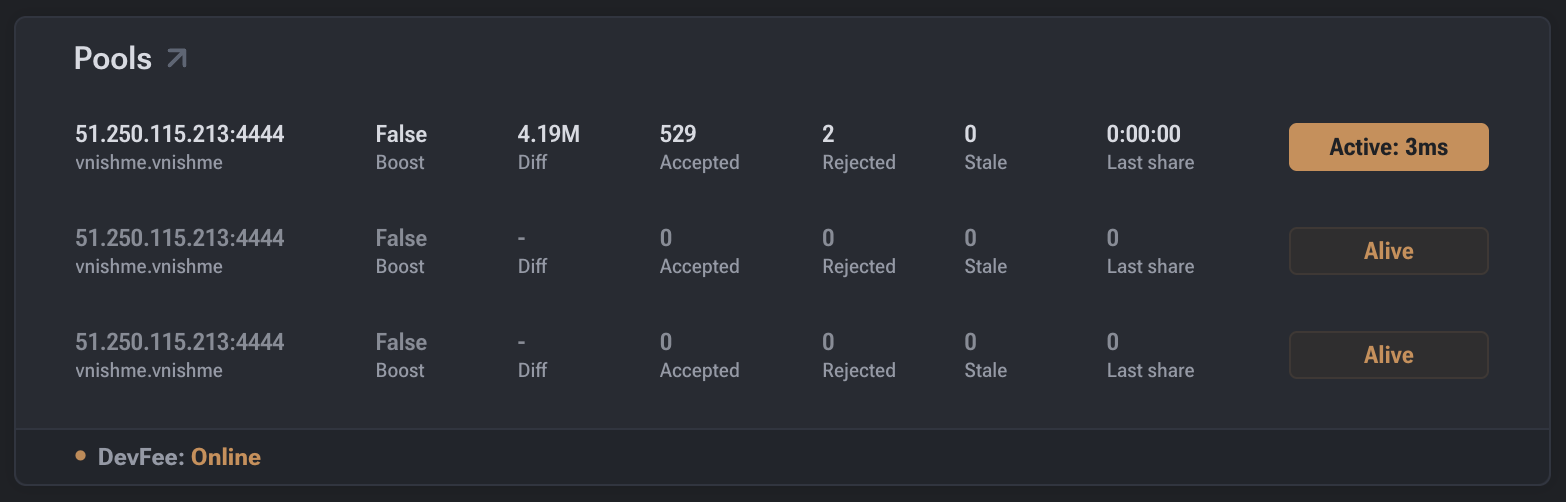
Displayed Parameters
- Pool URL — the address of the mining pool the device is connected to.
- Status — current connection status to the pool (primary / backup).
- Diff (Difficulty) — share difficulty issued by the pool.
- Accepted — number of shares successfully accepted by the pool.
- Rejected — number of rejected shares.
- Stale — number of stale shares.
- Last share — time elapsed since the last submitted share.
- Latency / Active — connection latency to the pool (ms).
- Boost — status of the accelerated mode (if supported).
Data Interpretation
- A high Accepted value indicates stable and correct miner operation.
- Elevated Rejected or Stale values may indicate:
- network delays;
- unstable internet connection;
- incorrect pool or hardware settings.
- Last share helps evaluate mining activity in real-time.
Practical Use
The Pools section is used for:
- Monitoring connections to primary and backup pools;
- Diagnosing network issues;
- Assessing pool performance;
- Analyzing the stability of share submissions.
Pool Priority
- The first pool in the list is the primary pool.
- If the primary pool is unavailable, the device automatically switches to the backup.
- The active pool is marked with the corresponding status.