

Dashboard (Main screen)
Cooling
Designed to monitor the status and operation of the miner's cooling system. Displays information about fans, their speed, and current status.
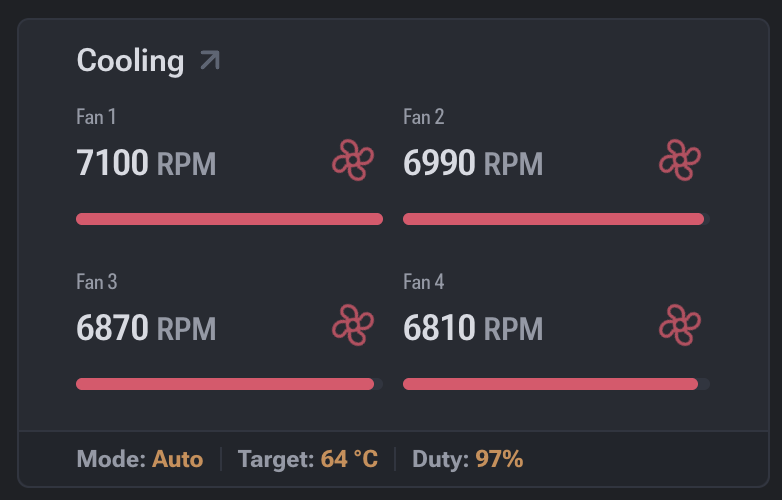
Displayed Parameters
- Fan number — fan identifier (Fan 1, Fan 2, etc.).
- RPM (Revolutions Per Minute) — fan rotation speed in revolutions per minute.
- Fan Duty (%) — fan load level in percent.
- Status — current fan status:
- OK / Active — the fan is working properly;
- Error — the fan is unresponsive or malfunctioning;
- Stopped / Disabled — the fan is stopped or disabled (if supported).
Data Interpretation
- Stable RPM and Fan Duty values indicate proper operation of the cooling system.
- Missing RPM or a status of Error indicates the system is not receiving correct data from the fan.
- High Fan Duty with stable temperature may indicate an aggressive cooling profile.
Practical Use
The Cooling section is used for:
- Monitoring cooling efficiency;
- Preventing overheating of the ASIC device;
- Diagnosing malfunctioning or disabled fans;
- Analyzing how the cooling system responds to temperature changes.
Impact on Device Operation
Malfunctioning fans can lead to:
- Increased chip temperatures;
- Reduced performance (throttling);
- Automatic mining shutdown to protect the hardware.
Recommended Actions for Fan Errors
If a fan shows Error status, it is recommended to:
- Check the physical connection of the fan.
- Ensure there are no mechanical damages.
- Inspect cables and connectors.
- Reboot the device.
- Replace the fan if a hardware failure is confirmed.