Network Group Management
Monitoring and Automation
Automatic statistics updates, search and navigation for network groups.
After creation, network groups are displayed in the main window with summary analytics, allowing you to assess the state of the entire farm without switching to the list of individual miners.
Data display
The following information is available in each group row:
- Devices: total number of discovered miners.
- Status: number of devices in Offline and Error states.
- Performance: total current hashrate of the group (PH/s or TH/s).
- Scan status: time since the last poll and current group uptime.
- Unlock: number of devices with successfully completed API authorization.

Automatic update (Auto-scan)
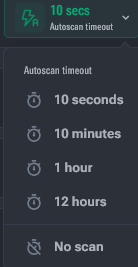
The feature allows Toolkit to poll groups in the background to keep metrics up to date.
- Activation: click the "Auto-scan timeout" button and select the pause interval between polling cycles.
- Participation indicator:
- 🟢 Green — the group is included in the automatic scanning cycle.
- ⚪ Gray — auto-scan is disabled for the group; data is updated manually only.
- Performance: scanning is performed in parallel for 5 groups simultaneously. Progress is shown by an indicator at the bottom of the group row.
- Manual start: updating statistics for a specific group is available via the context menu even when auto-scan is disabled.
Search and navigation
- Display order: groups are sorted by creation date (newest on top). The order can be changed by dragging (Drag&Drop) the group icon.
- Smart search (
Ctrl/Cmd + F):- If the query is an IP address, the search is performed by range inclusion (the group will be found even if the address is inside a range).
- Otherwise, the search is performed by group name, description, or range name.

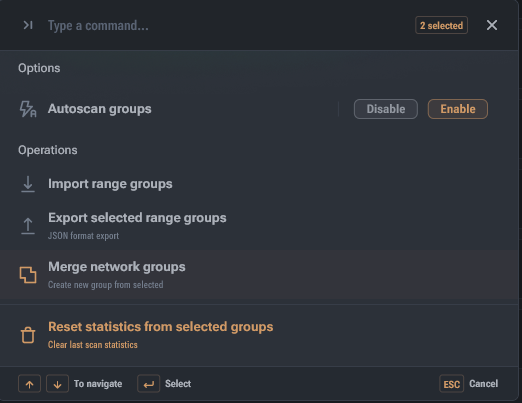
Group operations (Ctrl/Cmd + P)
When one or more groups are selected via checkboxes, a control panel appears:
- Bulk scan: start or stop statistics updates for selected groups.
- Merge: merge multiple groups into one while preserving all ranges.
- Reset data: delete accumulated statistics without deleting the group itself.
- Export: save selected configurations to a JSON file.