

Network Group Management
Group Settings Configuration
Managing access to miner configuration modification functions and configuring network timeouts.
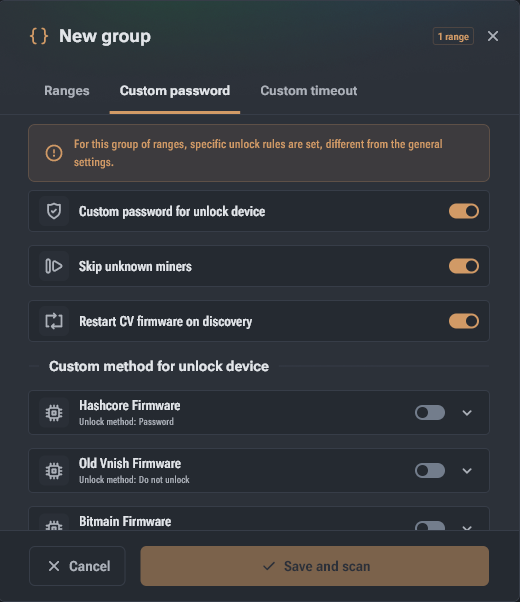
This tab is intended for managing access to miner configuration modification functions. To activate it, go to the "Custom password" tab and enable the "Custom password configuration" option.
Main unlock options
- Authorization methods: Depending on the firmware type, the following options are supported: password only, API key, or login + password combination.
- Individual passwords: Allows setting unique access credentials for APIs of different systems: Hashcore, Bitmain, Canaan, MicroBT, Luxor, Braiins, Auradine, ePIC, SunLune, PitBit, and others.
- Skip unknown miners: When enabled, Toolkit will not use the CG Miner protocol for devices with firmware that is not officially supported.
- CV auto-recovery: The "Restart CV firmware on discovery" option automatically launches or restores Hashcore/Vnish firmware on CVITEK platform devices directly during network scanning.
Custom network timeout
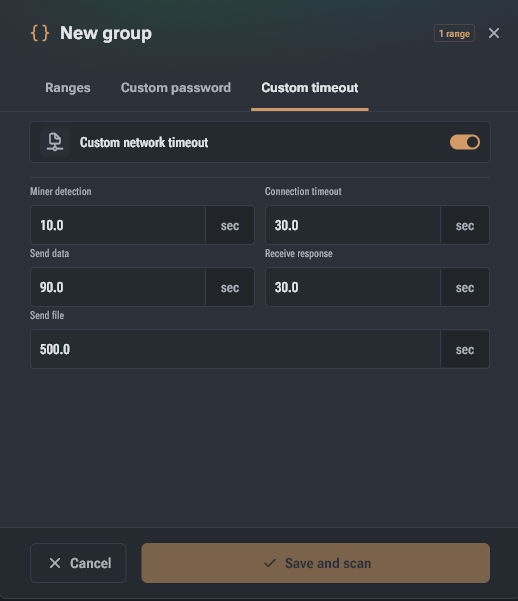
Configuring wait limits is critical for stable operation in "slow", congested networks or when connected via VPN. To set your own values, go to the "Custom timeout" tab and enable the "Custom network timeout" toggle.
Network interaction parameters (in seconds):
- Miner discovery: Time limit for receiving the first response from a device during scanning. Values that are too high slow down discovery; values that are too low may cause devices to be missed.
- Connection timeout: Maximum time allowed to establish a TCP connection from the miner side.
- Send data / Receive response: Time adjustment for command transmission and waiting for response data from the device.
- Send file: Maximum allowed time for uploading large data, such as firmware files.
Additional group management features
- Automatic statistics update: Enabled via the "Auto-scan timeout" button at the top of the window. Groups with a green indicator are polled in parallel (up to 5 groups simultaneously).
- Group commands: By selecting one or more groups, you can use the panel at the bottom of the screen (Ctrl/Cmd + P) to bulk change their auto-scan status, merge groups, or clear statistics.
- Configuration export: All settings (passwords, timeouts, ranges) are exported in JSON (UTF-8) format via the context menu or command dialog.