Network Group Management
Monitoring and Automation
Once created, network groups are displayed in the main window with summary analytics, allowing you to assess the state of the entire farm without navigating to a list of individual miners.
Displaying Data
The following information is available in each group's row:
- Devices: total number of miners found.
- Status: number of devices in Offline and Errors statuses.
- Performance: total current Hashrate of the group (PH/s or TH/s).
- Scan Status: time since the last poll and current group uptime.
- Unlock: number of devices with successfully completed API authorization.

Automatic Update (Auto-scan)
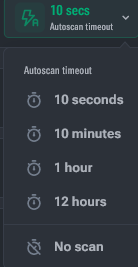
This feature allows Toolkit to poll groups in the background to update metrics.
- Activation: click the "Auto-scan Timeout" button and select the pause interval between polling cycles.
- Participation Indication:
- 🟢 Green — the group is included in the automatic scanning cycle.
- ⚪ Gray — auto-scan is disabled for the group; data is updated only manually.
- Performance: scanning is performed in parallel for 5 groups simultaneously. Progress is displayed by an indicator at the bottom of the group row.
- Manual Start: updating statistics for a specific group is available via the context menu even when auto-scan is disabled.
Search and Navigation
- Display Order: groups are sorted by creation date (newest on top). The order can be changed by dragging and dropping (Drag&Drop) the group icon.
- Smart Search (
Ctrl/Cmd + F):- If the query is an IP address, the search is performed by inclusion in ranges (the group will be found even if the address is within the range).
- In other cases, the search is by group name, description, or range name.

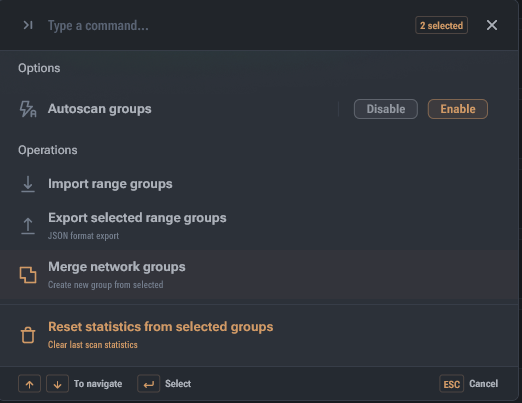
Group Operations (Ctrl/Cmd + P)
When one or more groups are selected with checkboxes, a control panel appears:
- Mass Scan: start or stop statistics updates for selected groups.
- Merge: combine multiple groups into one, preserving all ranges.
- Reset Data: delete accumulated statistics without deleting the group itself.
- Export: save selected configurations to a JSON file.