

Network Group Management
Group Settings Configuration
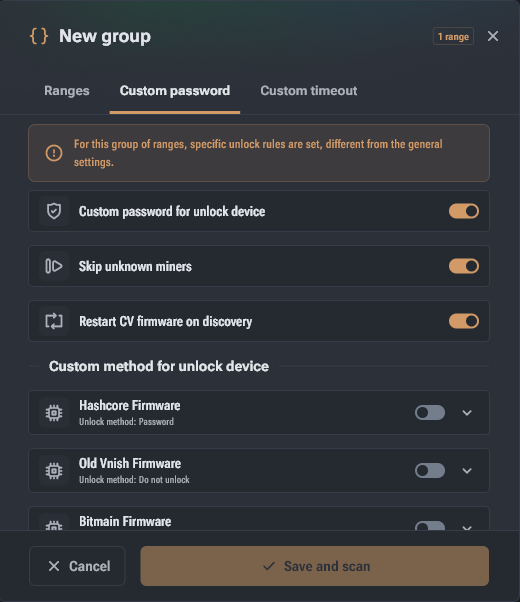
This tab is designed to manage access to miner configuration modification features. To activate, go to the
Main Unlock Options:
- Authorization Methods: Depending on the firmware type, the following options are supported: password only, API key, or login + password combination.
- Individual Passwords: Allows setting unique access credentials for the API of various systems: Hashcore, Bitmain, Canaan, MicroBT, Luxor, Braiins, Auradine, ePIC, SunLune, PitBit, and others.
- Skip Unknown Miners: When enabled, Toolkit will not use the CG Miner protocol for devices with officially unsupported firmware.
- CV Auto-Recovery: The "Restart CV firmware on detection" option automatically starts or restores Hashcore/Vnish firmware on CVITEK platform devices directly during network scanning.
Custom Network Timeout
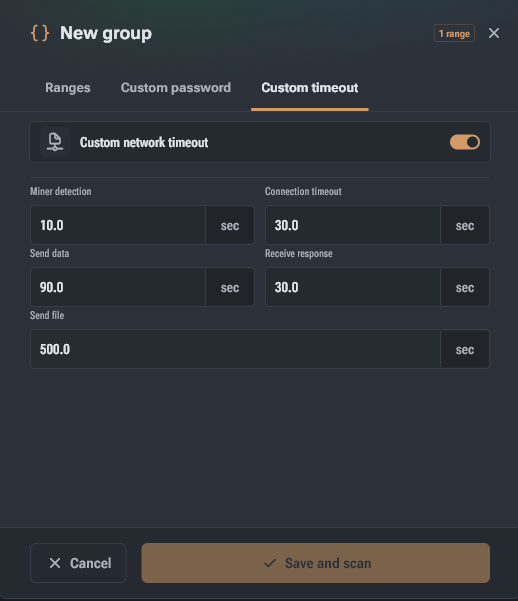
Configuring timeout limits is critical for stable operation in 'slow', congested networks or when connecting via VPN. To set your own values, go to the "Custom Timeout" tab and activate the "Custom Network Timeout" switch.
Network Interaction Parameters (in seconds):
- Miner Discovery: Time limit for receiving the first response from a device during scanning. Values that are too high slow down the search, while values that are too low lead to devices being missed.
- Connection Timeout: Maximum time for establishing a TCP connection from the miner's side.
- Send Data / Receive Response: Adjusts the time for transmitting commands and waiting for response data from the device.
- Send File: Maximum allowed time for uploading large data, such as firmware files.
Additional Group Management Features
- Automatic Statistics Update: Enabled by the "Auto-scan Timeout" button at the top of the window. Groups with a green indicator are polled in parallel (up to 5 groups simultaneously).
- Group Commands: By selecting one or more groups, you can use the panel at the bottom of the screen (Ctrl/Cmd + P) to bulk change their auto-scan status, merge groups, or clear statistics.
- Export Configurations: All settings (passwords, timeouts, ranges) are exported in JSON (UTF-8) format via the context menu or command dialog.
Import and Export Groups
Hashcore Toolkit allows for quick addition of equipment lists and network configurations.
Monitoring and Automation
Once created, network groups are displayed in the main window with summary analytics, allowing you to assess the state of the entire farm without navigating to a list of individual miners.