

Working with Proxy Groups
Creating a Proxy Group
- Click
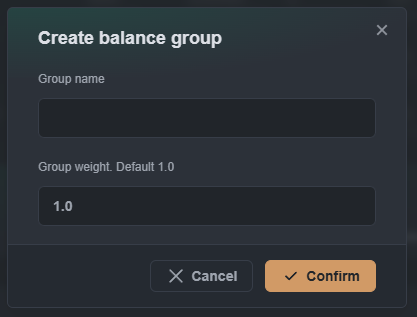
+ Create new balance group - In the “Create balance group” modal window, specify:
- Group name: group name.
- Group weight: group weight (default 1.0). Managing weights below.
- Click the
Confirmbutton
Managing Weights
Hashrate distribution occurs proportionally to group weights.
Version 1.3.1 and below: the maximum group weight value is 1.0. Version 1.3.2 and above: the maximum group weight value is 1000.0.
Distribution occurs based on the principle of proportions relative to other groups.
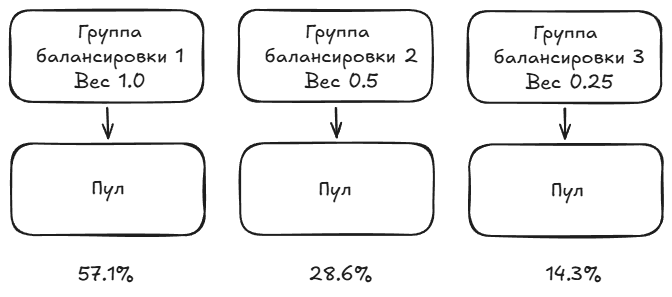
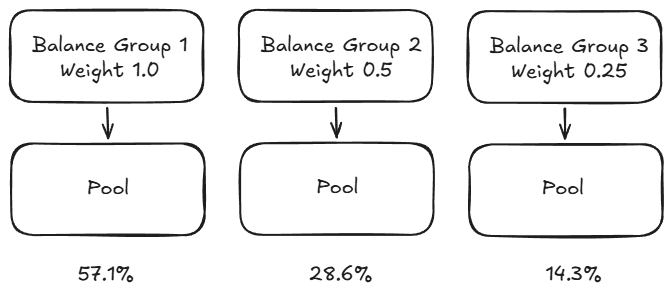
Examples of calculations for three groups:
| Group | Weight | Share Calculation | Hashrate Share |
|---|---|---|---|
| 1 | 1.0 | 1.0 / 1.75 | ≈ 57.14% |
| 2 | 0.5 | 0.5 / 1.75 | ≈ 28.57% |
| 3 | 0.25 | 0.25 / 1.75 | ≈ 14.29% |
| Total | 1.75 | — | 100% |
Absolute weight values are not important — only the ratio between them matters. Groups with weights 1.0, 0.5, 0.25 will yield the same distribution as 40, 20, 10 or 4, 2, 1.
A convenient way to set the distribution in percentages is to set the weights so that they sum up to 100. Then, each group's weight will directly correspond to its percentage of traffic:
| Group | Weight | Hashrate Share |
|---|---|---|
| 1 | 70 | 70% |
| 2 | 20 | 20% |
| 3 | 10 | 10% |
This is available starting from version 1.3.2, where the maximum weight is 1000.0, and any numbers can be freely used.
Managing a Proxy Group
To manage a group, click the three dots (⋮) on the right:
- Edit: change the group name and weight.
- Delete: delete the group.