

Web Configurator
Working with Proxy Ports
Creating and managing proxy ports in the HashCore Proxy web configurator.
Proxy Port Structure
- Port — the entry point for miners. HashCore Proxy can accept connections on multiple ports simultaneously. Each port is configured independently and can serve a large number of miners.
- Proxy groups — an intermediate balancing layer. Load between groups is distributed by weight.
- Pools — specific mining pools within a group. The first pool is primary, the rest are backups (Failover).
Creating a Proxy Port
- Click the
+ New proxy portbutton.
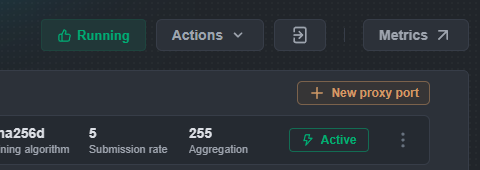
The "Proxy port configs" modal window will open.
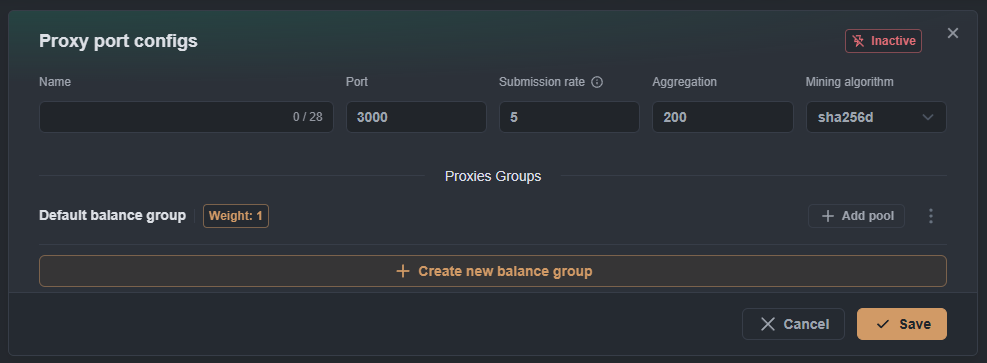
- Fill in the main parameters:
- Name — port name (up to 28 characters), used for identification in Grafana.
- Port — port number for miner connections (working range: 3000–4000).
- Submission rate — share submission frequency to the pool. Default: 5 (1 share every 5 seconds). Specified in seconds between shares:
5— 1 share every 5 seconds10— 1 share every 10 seconds2— 1 share every 2 seconds
In the YAML file, the same parameter is specified as frequency:
submission_rate: 0.2= 1/5. - Aggregation — number of miners per pool connection. Default: 200, maximum: 255.
aggregation: 10with 68 miners → 7 connections to poolaggregation: 255with 68 miners → 1 connection to pool
- Mining algorithm —
sha256d(Bitcoin/SHA-256D) orscrypt(Litecoin/Scrypt).
- Add at least one pool to each Proxy Group.
⚠️ If a group has no pools, clicking
Savewill show: "Pool group must have at least one pool" - Click
Save.
After saving, the port will appear with Inactive status. To activate, click ⋮ → Enable.
Managing a Proxy Port
- In the ports list, click
⋯to the right of the port. - From the context menu:
- Enable/Disable — toggle port on/off
- Edit — open settings
- Delete — delete the port
Settings are applied automatically without restarting the system.