

Web Configurator
Interface Overview
The HashCore Proxy web configurator main dashboard — top panel, port list, and management menu.
After authorization you will see the main management dashboard.
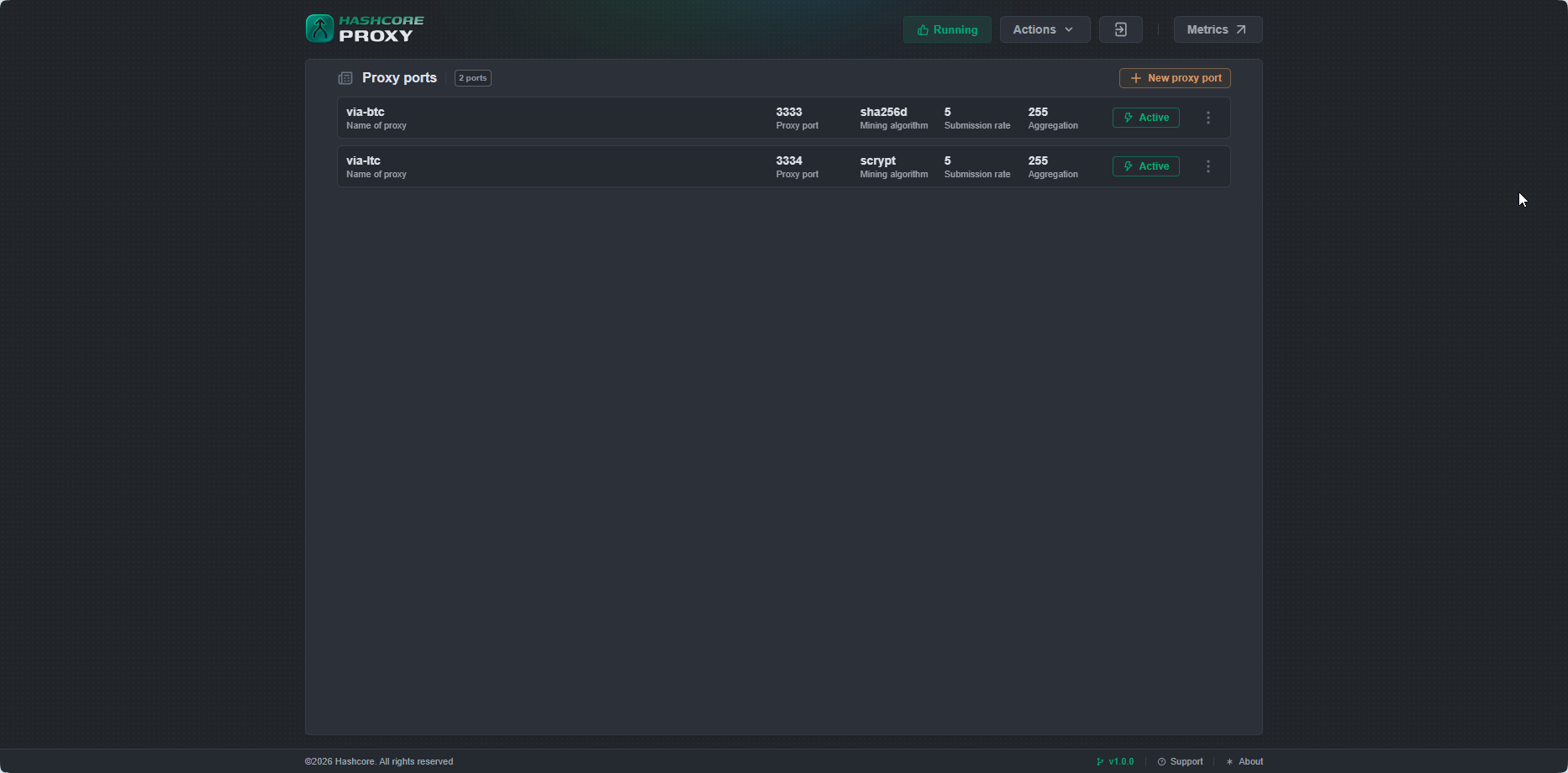
Top Panel

The top panel contains:
- Status indicator — current proxy service status:
- Running — proxy service is working normally.
- Stopped — proxy service is stopped.
- Restarting — proxy service is restarting.
- Failed — proxy service terminated with an error.
- Unknown — status unknown (no connection to service).
- Actions menu:
- Get diag report — generates a diagnostic report for contacting support.
- Restart proxy — restarts the proxy service.
- Stop proxy — stops the proxy service.
- Metrics — opens the Grafana monitoring dashboard.
- Logout button
Proxy Ports List
The Proxy ports section displays the list of configured ports. For each port:
- Name — port name
- Proxy port — port number for miner connections
- Mining algorithm — mining algorithm
- Submission rate — share submission frequency
- Aggregation — number of miners per pool connection
- Status — Active / Inactive
Port management menu (three dots ⋮ on the right):
- Enable — enable or disable the port
- Edit — open port settings
- Delete — delete the port