

Web Configurator
Working with Proxy Groups
Creating and managing hashrate balancing groups in the HashCore Proxy web configurator.
Creating a Proxy Group
- Click
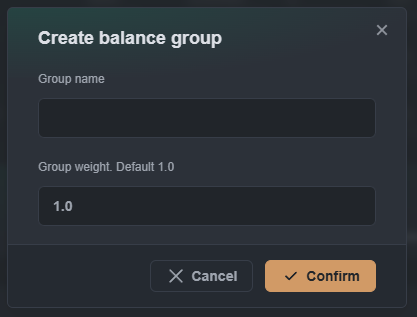
+ Create new balance group. - In the "Create balance group" modal, specify:
- Group name — group name.
- Group weight — group weight (default: 1.0).
- Click
Confirm.
Managing Weights
Hashrate distribution is proportional to group weights.
Version 1.3.1 and below: maximum group weight — 1.0. Version 1.3.2 and above: maximum group weight — 1000.0.
Example calculation for three groups:
| Group | Weight | Share Calculation | Hashrate Share |
|---|---|---|---|
| 1 | 1.0 | 1.0 / 1.75 | ≈ 57.14% |
| 2 | 0.5 | 0.5 / 1.75 | ≈ 28.57% |
| 3 | 0.25 | 0.25 / 1.75 | ≈ 14.29% |
| Total | 1.75 | — | 100% |
Absolute weight values don't matter — only the ratio between them does.
A convenient way to set distribution by percentage — set weights that sum to 100:
| Group | Weight | Hashrate Share |
|---|---|---|
| 1 | 70 | 70% |
| 2 | 20 | 20% |
| 3 | 10 | 10% |
Available from version 1.3.2.
Managing a Proxy Group
Click ⋮ to the right of the group:
- Edit — change group name and weight.
- Delete — delete the group.