

Performance
This section is used to manage overclocking, frequencies, and voltage. Here, the balance between hashrate, power consumption, and stability is configured.
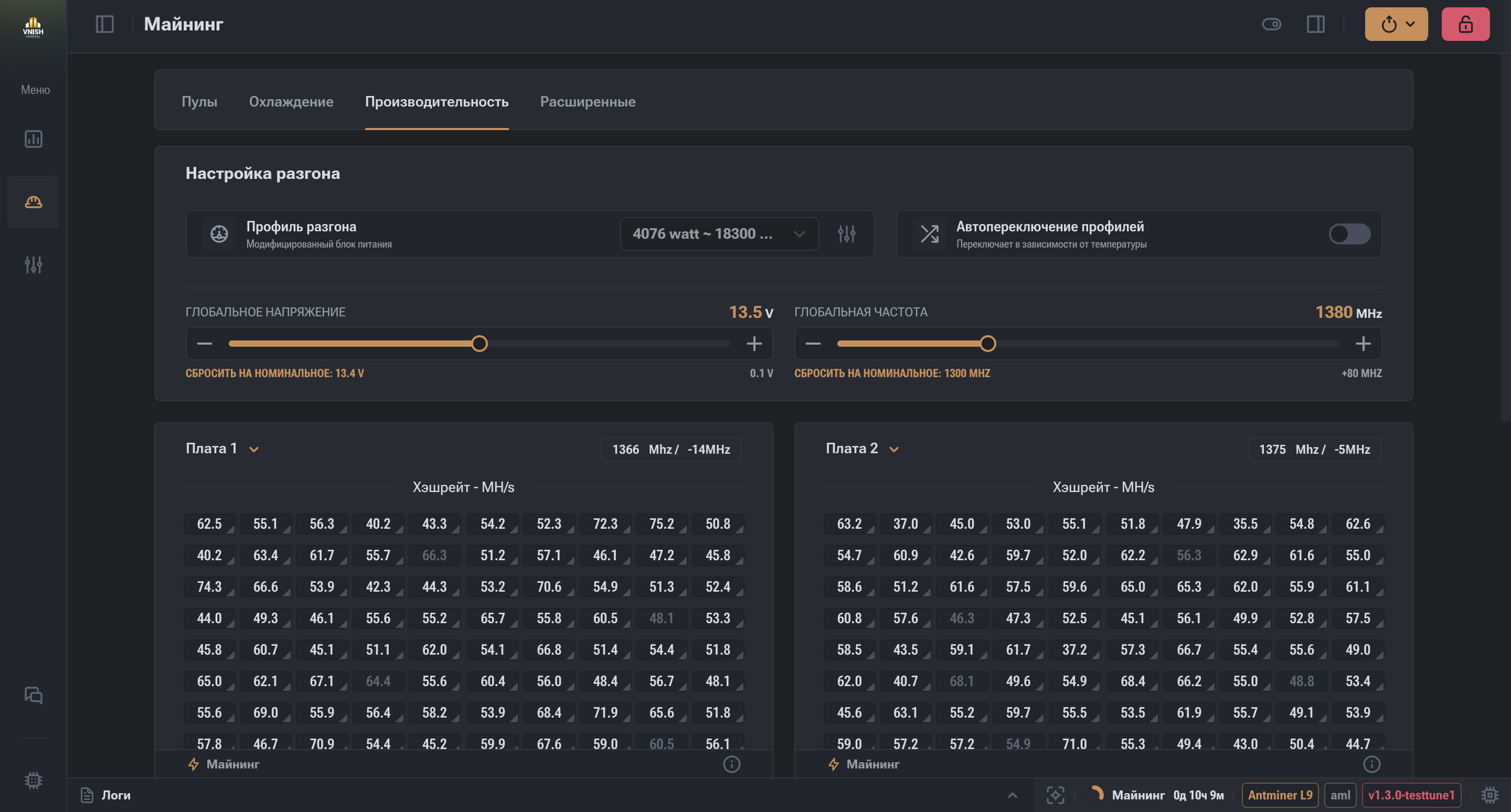

The "Modified Power Supply (LC)" parameter is designed for the correct operation of the miner with a modified power supply that supports an extended voltage range.
When this parameter is enabled, the system takes into account the features of the modified power supply and correctly applies voltage settings within the extended range.
This parameter is used only if the power supply has been modified accordingly.
Note
If a standard power supply is used, the parameter should remain disabled.

Function Purpose
The "Overclocking Profile" function is designed for selecting and managing miner overclocking profiles.
A profile defines a set of equipment operating parameters, including target power consumption and performance.
Description
The interface provides a list of overclocking profiles, each containing information about:
- estimated power consumption;
- target Hashrate level;
- profile status (tuned).
The user can select one or more profiles for further use, as well as reset them.
Profile Management
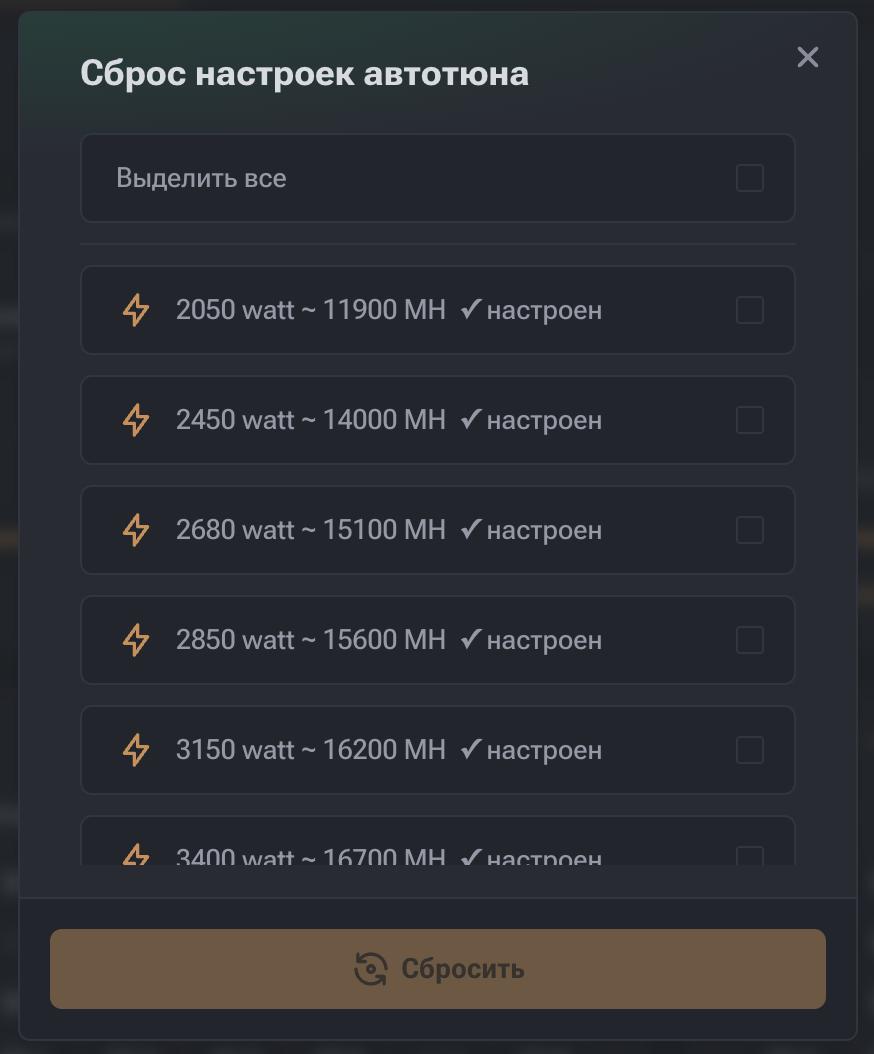
The profile management window allows you to:
- view available profiles;
- select profiles for operation;
- reset selected profiles.
All changes are applied within the current miner configuration.
Note
Overclocking profiles are used both manually and by the auto profile switching mechanism, if the corresponding function is enabled.

The "Auto Profile Switcher" function is designed for automatically increasing or decreasing the overclocking profile (preset) depending on:
- chip temperature;
- power consumption;
- miner stability.
The main goal is to maintain a balance between performance, temperature, and equipment safety without manual intervention.
In addition to automatic tuning, the firmware provides the ability to manually adjust the frequency.
The frequency can be set:
- globally for the entire miner;
- separately for each board (chain);
- individually for each chip.
This feature is intended for users with the necessary technical knowledge and allows for manual control of equipment operating parameters.
Function Parameters

If the maximum chip temperature on the miner is below the specified value, the system increases the profile (switches to a more productive preset).
Important:
- the maximum chip temperature is used, not the average;
- the current measurement time is taken into account.
Example:
Value: 66 °C → if maximum chip temperature < 66 °C → profile is increased.

If the maximum chip temperature exceeds the specified threshold, the system decreases the profile, reducing the thermal load.
Example:
Value: 74 °C → if temperature > 74 °C → profile is decreased.

The time during which the system collects and averages metrics before deciding to switch profiles.
Features:
- smaller value → faster reaction, but lower accuracy;
- larger value → more stable decisions, but slower reaction.
Recommended value: 5 minutes Allowed range: 1–10 minutes

Limits the maximum profile to which the Switcher can increase performance.
Even if the temperature allows it, the system will not go above this preset.
Used for:
- limiting power consumption;
- adhering to infrastructure limits.

Limits the minimum profile below which the Switcher cannot decrease performance.
Helps avoid excessive Hashrate reduction.

Controls actual power consumption relative to the nominal value specified in the profile.
Can be set:
- in percent (%)
- in watts (W) Operating Logic:
If actual consumption exceeds the allowed limit → the profile is automatically decreased.
Purpose:
- protection of outlets and PDUs;
- preventing electrical grid overload.

If an error or instability occurs when using the current maximum profile, the system:
- automatically reduces the profile to the last stable one.
- used as a self-recovery mechanism.

Allows the Switcher to disregard fan speeds when deciding to switch profiles.
Used in scenarios of:
- external fan control;
- non-standard cooling systems;
- manual airflow control.

Global voltage defines the voltage level used by the miner within the selected profile.
This parameter:
- is set directly;
- has no additional nested levels;
- is applied without additional logic.
Global voltage and global frequency parameters are available and applied only when using a tuned profile.
All changes to these parameters are saved exclusively in the configuration of the selected profile.
When using the no-profile mode (Disable), these parameters are applied to the entire miner, and settings saved in the profile are not used.

Global frequency defines the base frequency for the entire miner, however, its presence does not mean that this specific value will be used by all boards and chips.
Global frequency is used as the top level of the frequency hierarchy and can be overridden by lower-level settings.
All changes to the global frequency with an active profile are saved in the profile configuration, not in the general miner config.
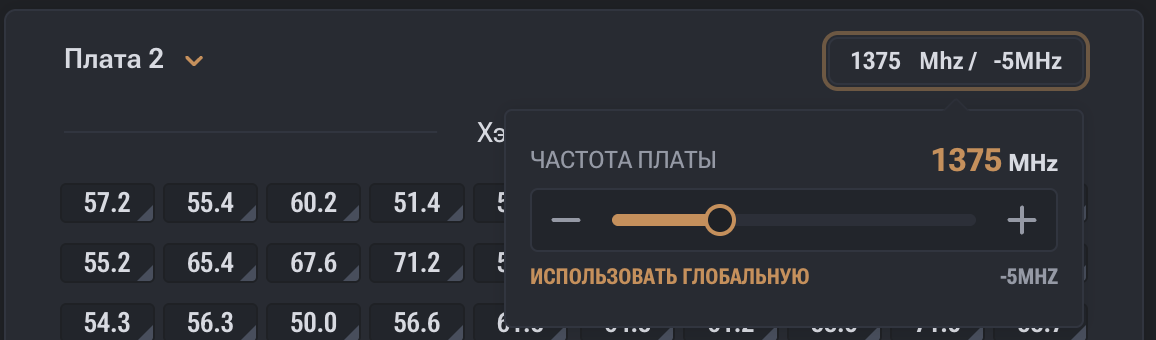
Each miner board has its own global board frequency.
Features:
- each board can have its own frequency value;
- a board can use:
- its own frequency;
- or the global miner frequency.
If the "use global frequency" option is selected for a board, it adopts the global miner frequency value.
If a custom value is set, that value is used.
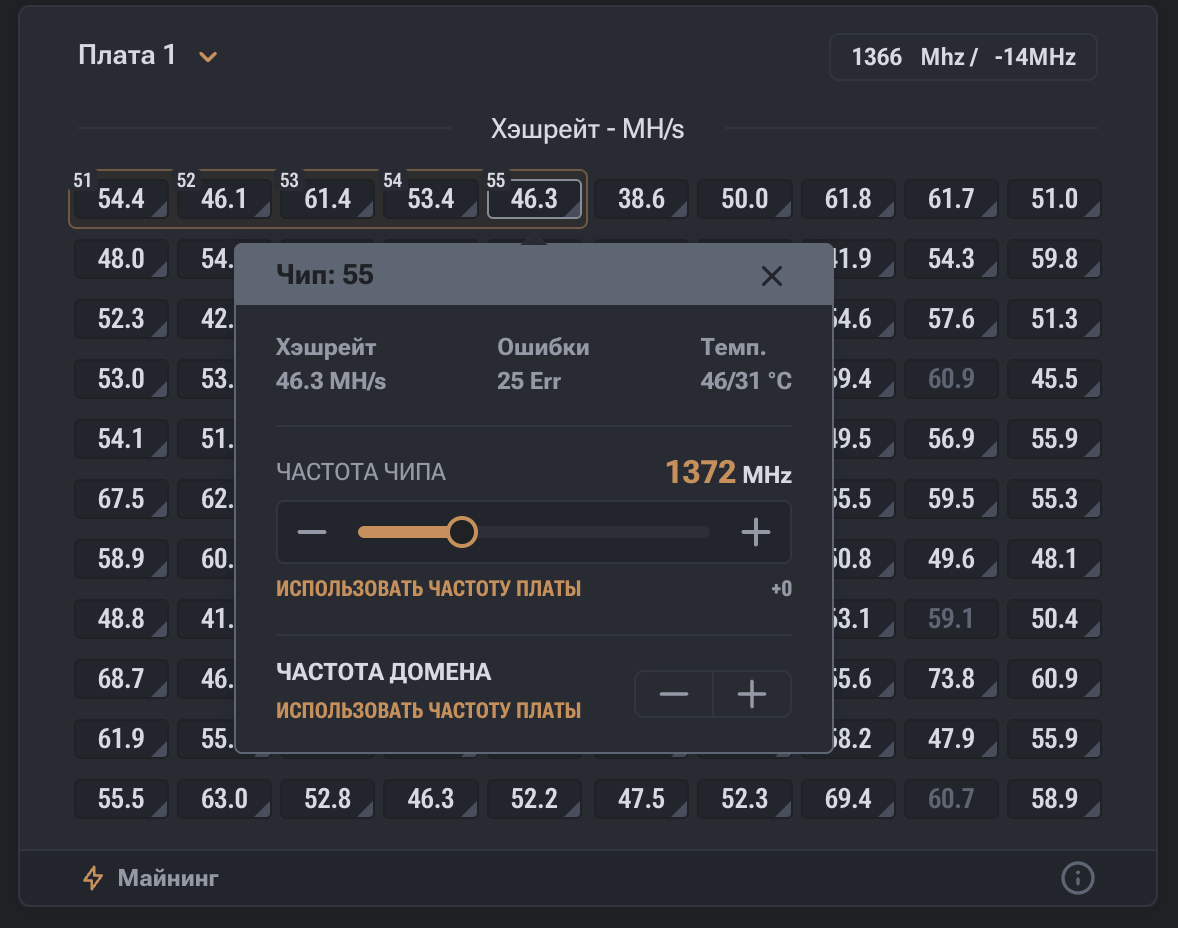
Each chip can have individual frequency settings.
Possible options:
- use board frequency;
- use global frequency;
- use its own individual value.
If the "use board frequency" option is selected for a chip, it inherits the frequency of the corresponding board.
If the board uses the global frequency, the chip, accordingly, operates at the global miner frequency.
Board Management
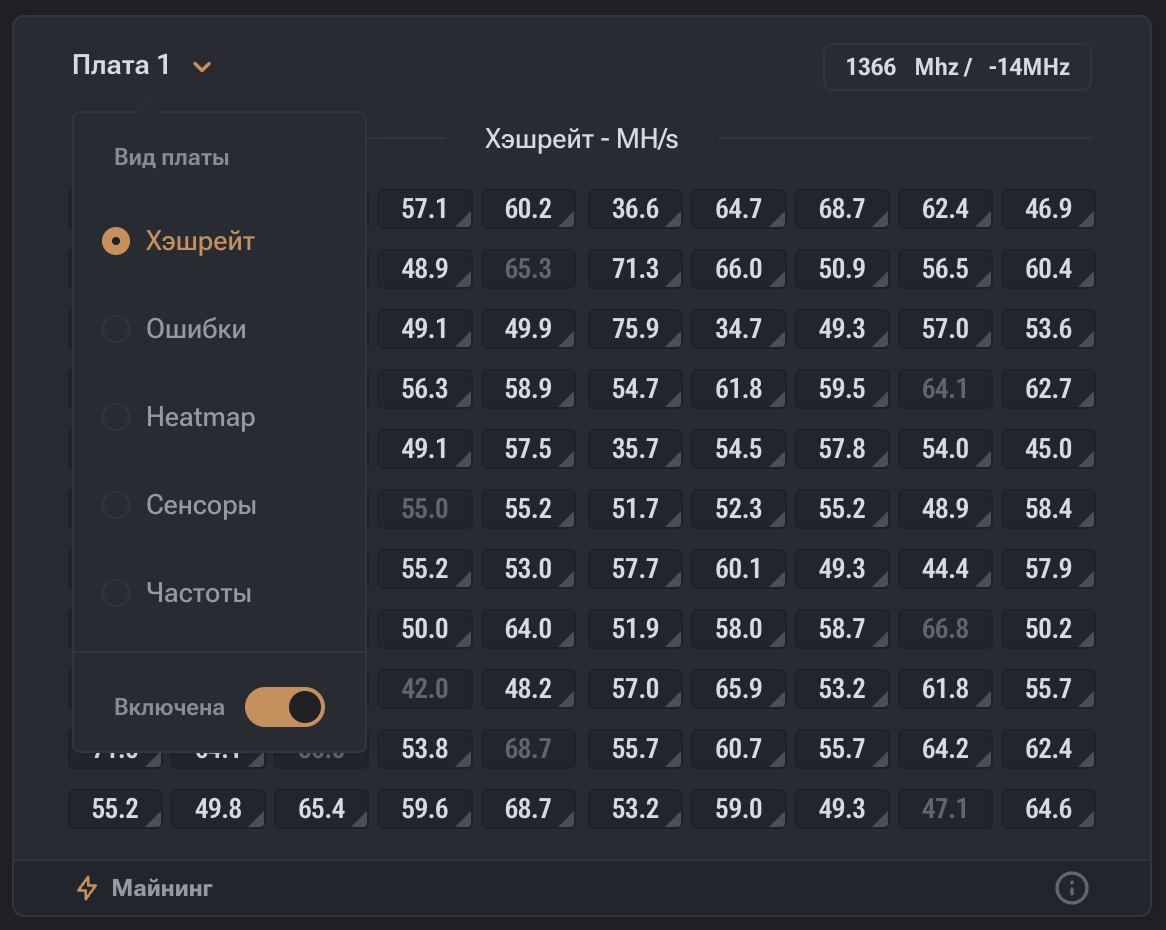
Each miner board has a separate interface for management and data display.
Display Modes
Various information display modes can be selected for a board, including:
- Hashrate by chips;
- errors by chips;
- frequencies;
- thermal map;
- sensor temperatures
The selection of the display mode only affects the visual representation of data and does not change the equipment operating parameters.
Board Disabling
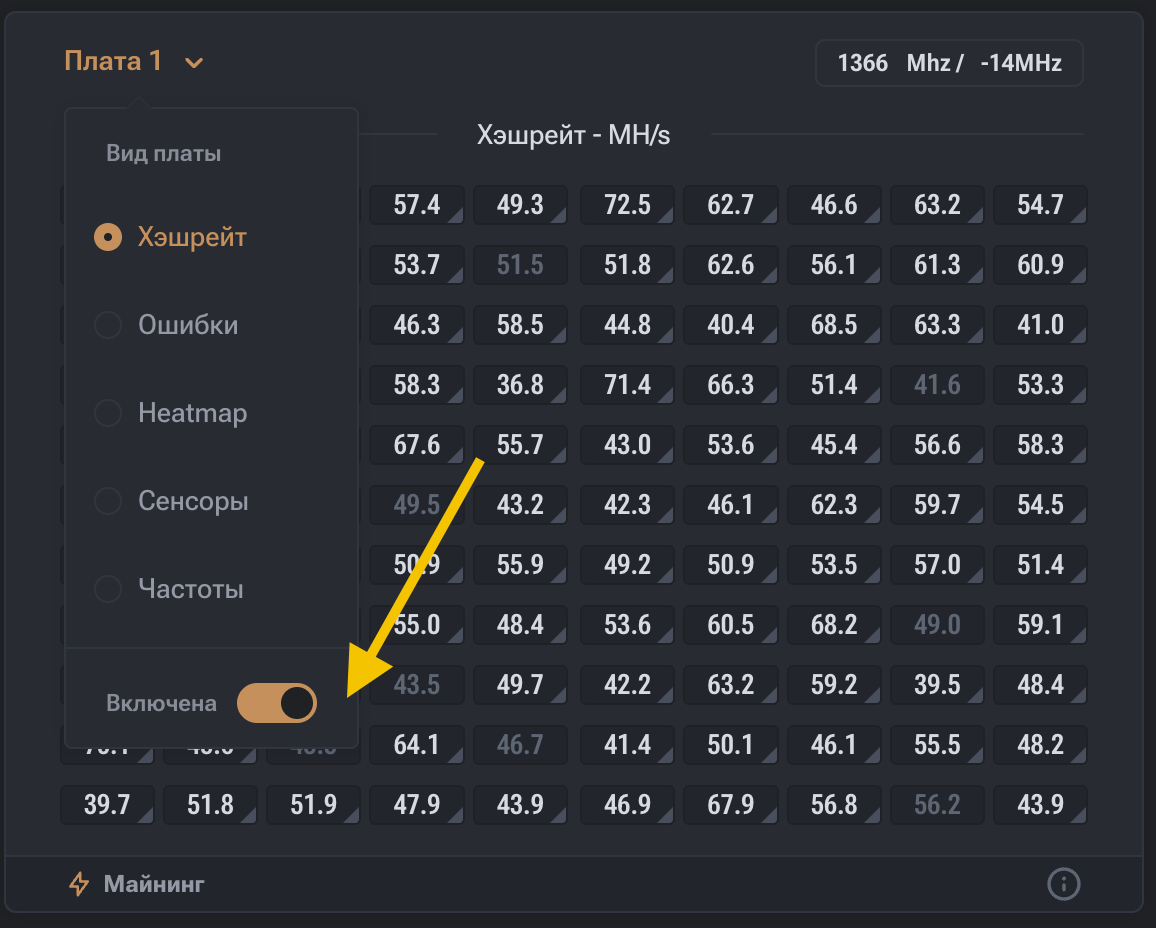
Each board can be disabled.
Depending on the miner model and hardware features, the method of disabling a board may vary.
In supported configurations, a board can be disabled directly through the board interface.
In other cases, a separate additional setting is used.
Profile Operation Features
When using profiles, board and chip settings are saved in the profile configuration.
When switching from a tuned profile to no-profile mode (Disable):
- previously set frequencies and voltages are not automatically reset;
- board and chip parameters are retained in the state they were previously set.
To apply global frequency and voltage values, it is recommended to manually reset settings for each board.
Summary
The overclocking section allows you to manage miner overclocking in both manual and automatic modes, as well as view statistics for each chip (Hashrate, frequencies, temperatures, errors).