

Mining
Cooling
Central temperature management node to prevent overheating and optimize noise levels.
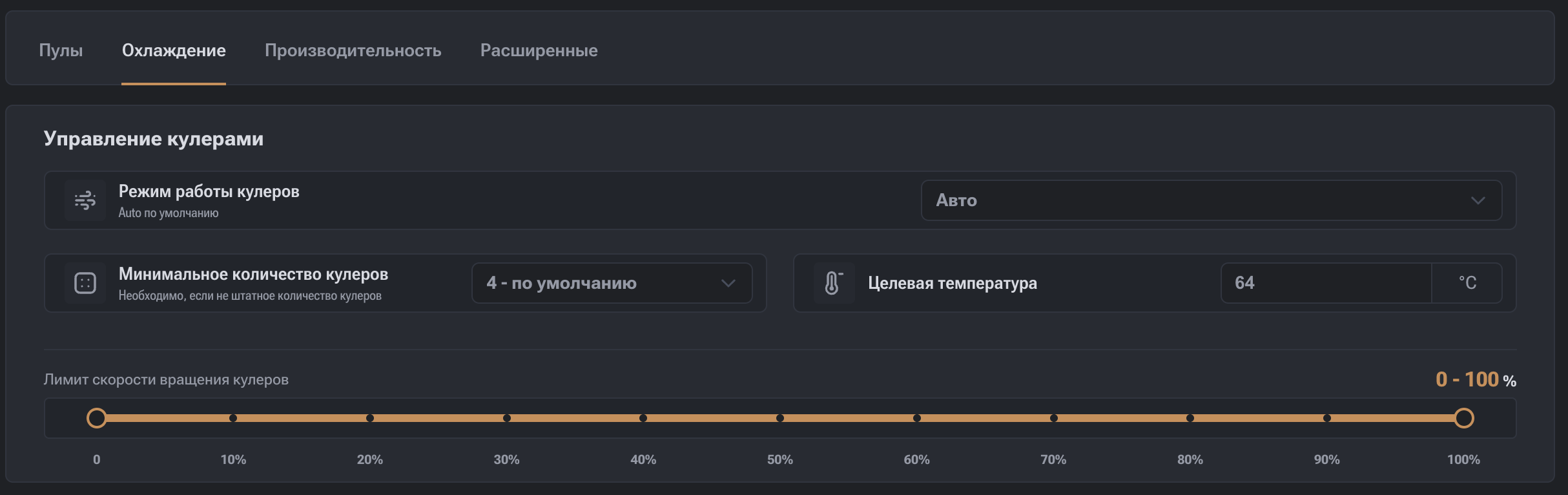
- Fan Operation Mode:
- Auto: The firmware automatically adjusts fan speeds based on chip temperature. This is the safest mode.
- Manual: Fan speed is set to a fixed PWM level (e.g., 40%, 70%, 100%) regardless of temperature.
- Immersion: Fans are completely turned off for liquid immersion operation; control is based on liquid heating (inlet-outlet).
- Target Temperature: Sets the chip temperature (recommended value — 65°C) that the system will maintain by adjusting fan speeds.
- Minimum Number of Fans: Specifies the number of fans that must be operational (default — 4).
- Fan Speed Limit: A slider to restrict the fan power range in percentages (from 10% to 100%).
Pools
This screen is used to configure mining Pools and manage their usage order. Here, the primary and backup Pools, Worker parameters, and authorization settings are defined.
Performance
This section is used to manage overclocking, frequencies, and voltage. Here, the balance between hashrate, power consumption, and stability is configured.