

Settings
General Settings
Application appearance and main characteristic settings.
The general settings group contains items that change the appearance and main characteristics of the application.
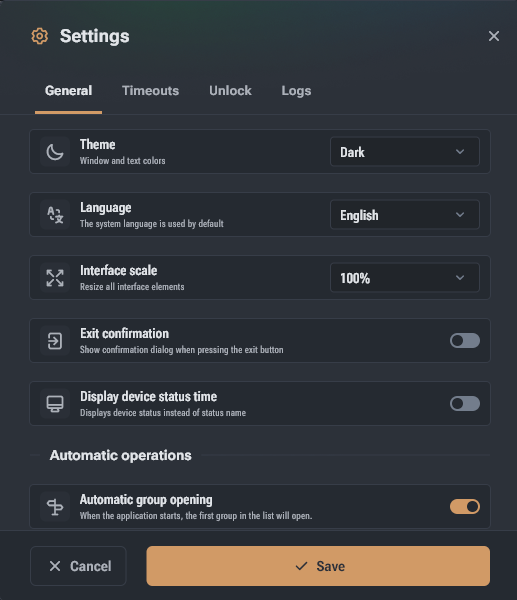
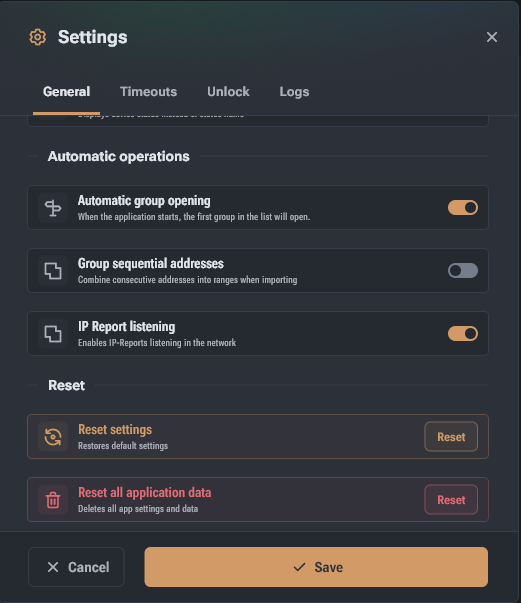
- Theme – the color scheme of the program interface. For preview purposes, the color scheme is applied immediately but is not saved until you click Save.
- Language – the language of the interface labels. For preview purposes, changes apply immediately but are not saved until you click Save.
- Interface scale – adjusts the scale of control elements and text while maintaining proportions. Changes apply immediately but are not saved until you click Save.
- Exit confirmation – displays a confirmation dialog when closing the main window. Option available only for Windows and Linux.
- Show status time – in the device list, instead of the status name, the time during which the device has been in the current status will be displayed (if available). When disabled, status time can be seen by hovering over the status name.
- Auto-open group – Hashcore Toolkit will open the first group from the list when launching the application.
- Group consecutive addresses – when importing text files, the app collects consecutive IP addresses into ranges.
- Reset settings – deletes saved settings and restores default settings.
- Reset all app data – deletes all saved application data.