

Settings
Logging Settings
Application logging management and diagnostic reports.
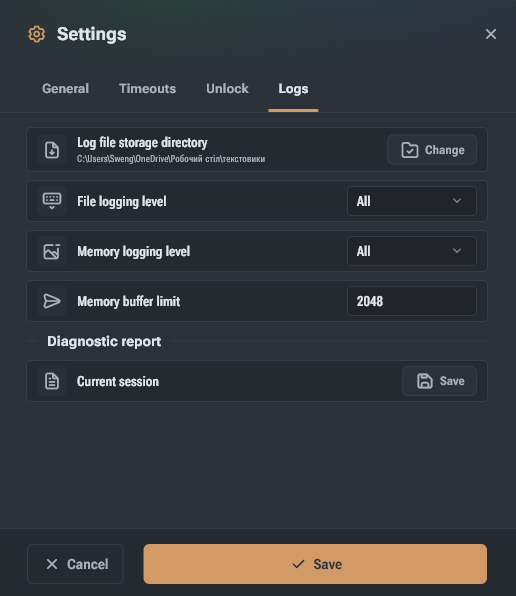
The logging group contains settings for managing application logging.
- Log file directory – folder to save application log files. By default, the system cache folder is used.
- File logging level – minimum importance level of data saved to log files. A new log file is created at each application launch.
- Memory logging level – minimum importance level of data saved in device memory.
- Memory buffer limit – maximum length of in-memory logs. Older entries will be removed when exceeding the limit.
- Diagnostic report → Current session – allows saving a diagnostic report to send Hashcore data about application issues.
API Unlock Settings
Data sent to devices to gain access to API functions that modify device configuration.
Who Is This Product For
HashCore Pulse is an enterprise platform for monitoring and managing industrial mining equipment. The product is built for teams responsible for ensuring uninterrupted operation of ASIC device fleets.