

Device Management
Firmware
Install Firmware
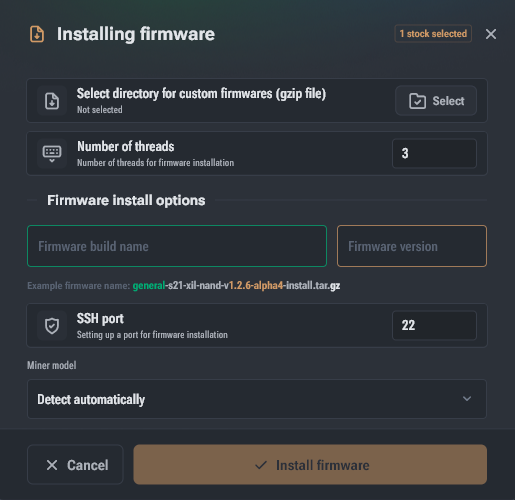
Installs Hashcore/Vnish firmware on Antminer family devices.
If there are no compatible devices among the selected ones, an informational message is displayed instead of the dialog — you need to check if the devices meet the installation requirements.
The installation dialog includes:
- selecting the firmware directory
- build name and firmware version
- number of threads (regulates network load during mass installation)
- if necessary — manual model selection (if auto-detection is not suitable)
Firmware files are tar.gz archives. No unpacking is required: Toolkit asks you to specify the folder where the archives are located.
Update Firmware
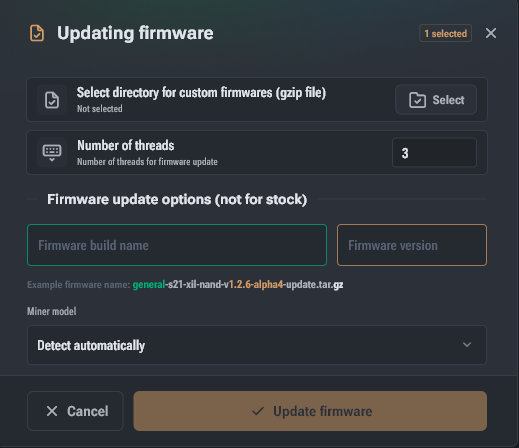
Updates Hashcore/Vnish and Bitmain firmware on devices.
- The dialog is similar to installation.
- If there are Bitmain devices among the selected ones, an additional Bitmain update file selection appears.
- If there are no Hashcore/Vnish devices selected, the fields for folder/build/version are hidden.
Firmware Commands Without Additional Dialogs
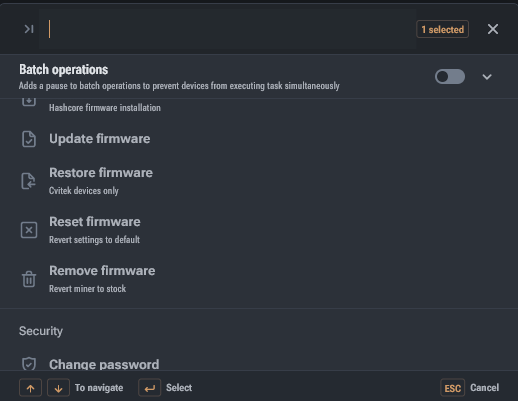
Launched after confirmation:
- Restore Firmware — launches Hashcore/Vnish on CVITEK platforms after device restart
- Reset Firmware — resets firmware settings to default values
- Delete Firmware — deletes Hashcore/Vnish, Braiins, Luxor from Antminer family devices