

Device Management
Commands Dialog ("All Commands")
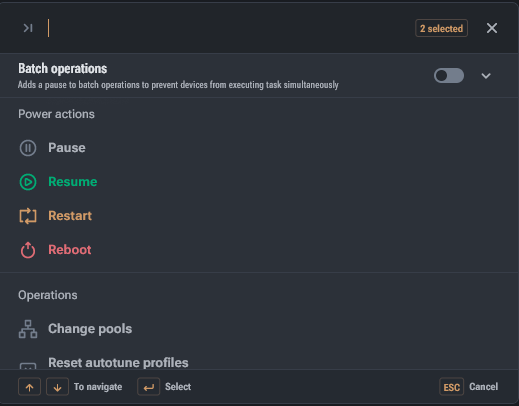
The commands dialog contains all supported commands, except for cloning settings.
At the top of the dialog:
- search by command name
- number of selected devices
Batch Operations (Batch)
Below the search bar is the batch operations block.
- By default, batch operations are disabled — global settings are applied.
- Batch mode allows commands to be executed in portions, with a specified pause between batches of launches.
- This is necessary to smooth out load/voltage spikes when a command is applied to hundreds of devices. Power / Mining Actions
Power actions do not require additional settings:
- Pause — pauses mining. For Bitmain, it puts the device into Sleep mode.
- Resume — resumes mining. For Bitmain, it sets the mode to Normal.
- Restart — restarts mining. For Bitmain, it sets the mode to Normal.
- Reboot — reboots the device's operating system.