

Firmware Management
Update Vnish Firmware
Process of updating already installed Vnish firmware on miners.
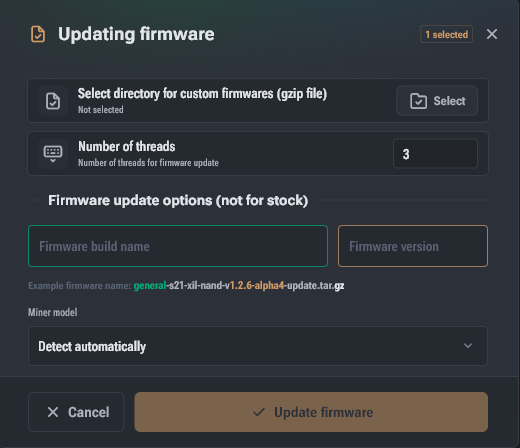
- Open the miner group you will be working with. Toolkit will automatically scan the IP addresses added to the group and show active devices.
- Select one or more miners that already have Vnish firmware installed and need to be updated.
- In the interaction menu, click the Commands button.
- Select the Update firmware item.
- In the update parameters, specify:
- path to firmware files;
- firmware name;
- firmware version.
- Click the firmware update button.
The update status can be tracked in the Operations tab.
Firmware file parameters example
Example firmware file name: vnishdotcom-s19-xil-aml-v1.2.6-rc4-update.tar.gz
Firmware name: vnishdotcom
Firmware version: 1.2.6-rc4
File type: update
Downloaded firmware files do not need to be extracted.