

Bulk Operations
Detailed Worker Template Configuration
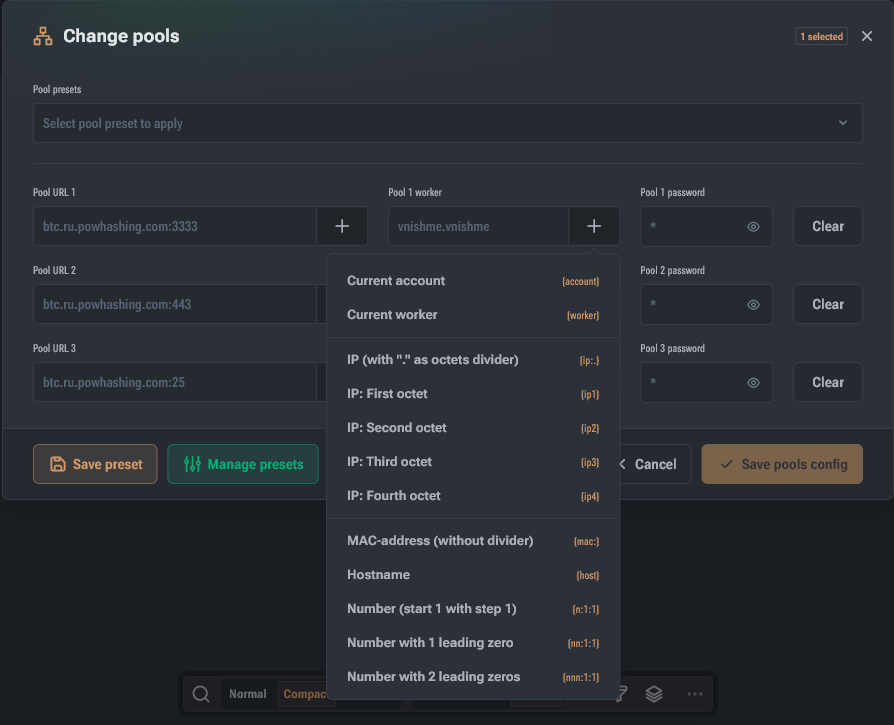
When performing bulk pool changes, Hashcore Toolkit allows the use of dynamic templates to automate device naming. The system displays a real-time "Preview" of the final string directly below the input field.
Network Identification:
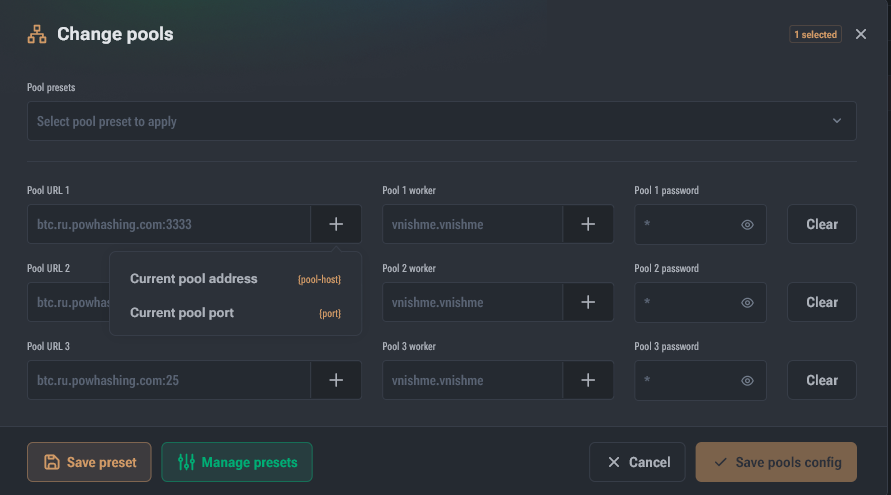
{ip:<separator>}: full IP address with a customizable octet separator (default is.).{ip1}, {ip2}, {ip3}, {ip4}: use specific octets of the device's IP address.{mac:<separator>}: device's MAC address with a customizable separator.{host}: network hostname from the device's system settings.{pool-host}: substitutes the current pool's address.{port}: substitutes the current pool's port.
Intelligent Numbering:
{n}, {nn}, {nnn}: define the number of digits in the sequential number (e.g., 1, 01, or 001).{nnn:start:step}: sets the starting number and increment step (e.g.,{nnn:10:2}will create the sequence 010, 012, 014...).
Parsing Existing Names:
{account}: the part of the current worker before the first dot (e.g., username).{worker}: the part of the current worker after the first dot (the device's name itself).
Recommendations and Best Practices
To ensure stable farm operation and minimize risks during mass operations, adhere to the following rules:
Installing Vnish Firmware
Firmware Management allows you to install and update firmware (including Vnish), as well as restore/downgrade to factory firmware if necessary.