

Proxy
Working with web config
Web-based configurator for managing proxy settings, pools, and service status.
Accessing the Configurator
Open in your browser: http://localhost:5001
In the main window you will see:
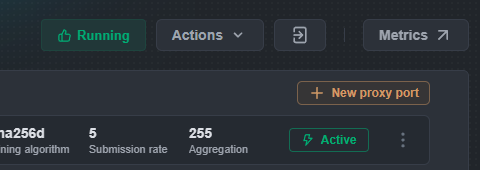
- Running indicator: Shows the current status of the proxy service.
- Actions menu:
- Get diag report: Generates a report for technical support in case of issues.
- Restart/Stop proxy: Allows you to manage the process directly from the browser.
- Metrics: Quick access to monitoring charts.
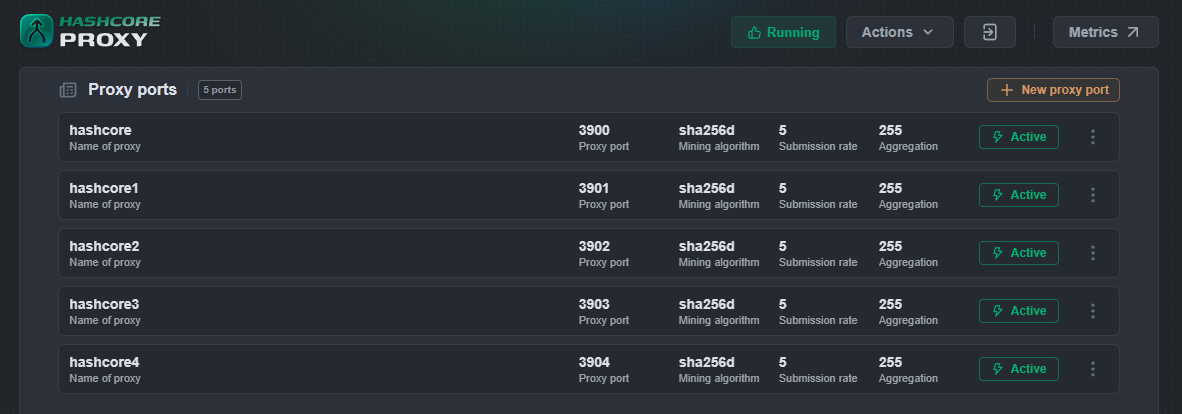
Creating new proxy port
- In the “Proxy ports” section, click
+ New proxy port - A window “Proxy port configs” will open
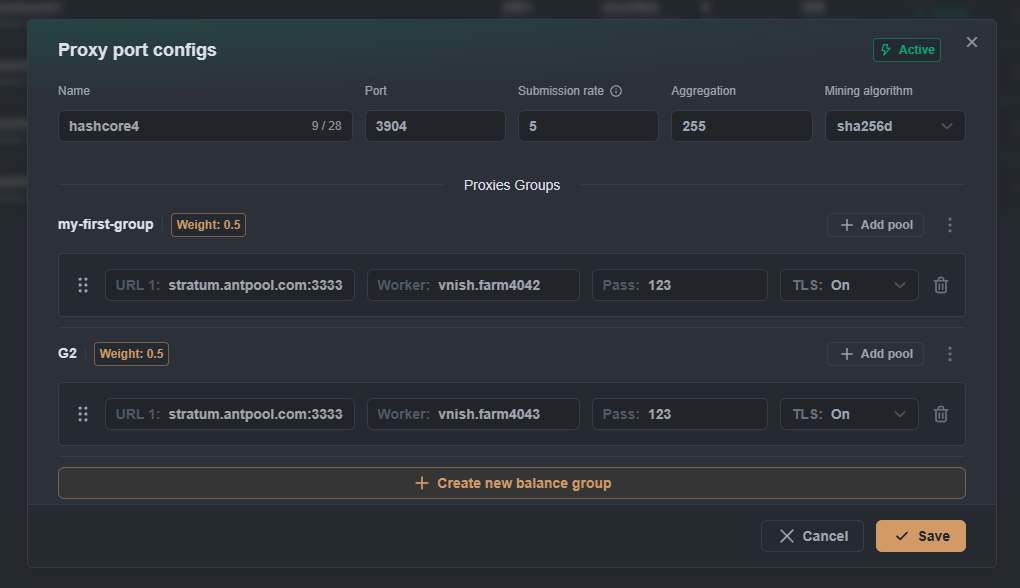
At the top of the window, fill in:
- Proxy name: Port name (used for identification in Grafana)
- Proxy port: The port number miners will connect to (e.g., 3000–4000)
- Submission rate: Share submission frequency (default 5 = 1 share every 5 seconds)
- Aggregation: Number of miners per pool connection (recommended 20–255)
- Mining algorithm: Choose from the dropdown list:
sha256dfor Bitcoinscryptfor Litecoin
HashCore Proxy supports an advanced hashrate balancing system between pool groups.
Working with existing groups
By default, a Default balance group is created with a weight of 1.
Adding pools to a group
- Click
+ Add poolin the target group. - Fill in the pool parameters:
- URL X: Stratum server address (for example,
stratum.antpool.com:3333) - Worker: Your account + worker name (acc.worker)
- Pass: Password (not hidden)
- TLS: On/Off toggle for encrypted connection

- URL X: Stratum server address (for example,
Creating additional groups
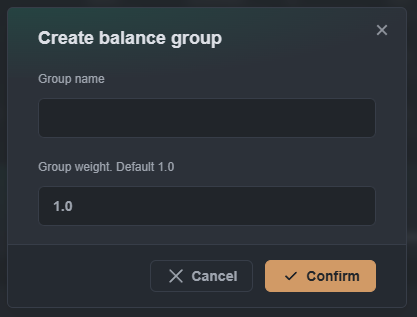
- Click “+ Create new balance group”
- In the “New / Edit group” modal, specify:
- Balance group name: Group name
- Group weight: Group weight (default value is 1.0)
- Click “Confirm”
Weight distribution logic: If you have two groups with weights 0.5 and 1.0, the hashrate will be distributed in a 1:2 ratio respectively.
Pools actions:
- Drag & Drop: Use the ⋮⋮ icon to reorder pools
- Delete: Click the trash icon to remove a pool
- Validation: The system automatically checks the validity of the URL
Group Requirements:
- Each group must contain at least 1 pool
- If this condition is not met, a warning appears: “Pool group must have at least one pool”
- Review all settings
- Click “Save config” (orange button)
Managing Existing Ports
Accessing Port Settings:
- In the ports list, click the three dots (⋯) on the right side of the desired port
- From the context menu, select the required action:
Available Actions:
- Enable/Disable: Toggle to activate or deactivate the port
- Copy stratum URL: Copy the connection URL for miners
- Edit: Open the port configuration window
- Delete: Remove the proxy port
Quick Management
- Status: Each port’s status is displayed in the table (“Active” shown in green)
- Monitoring: All key parameters are visible in the main list
- Instant changes: Any edits are applied immediately without restart
Manual Configuration (Alternative method)
You can also modify the HashCore Proxy settings manually in the file config/stratum-proxy.yaml:
log_level: info
api_port: 5010
log_dir: ./configs/log
telemetry: null
upstream_tcp_settings:
  keep_alive:
    idle_time:
      secs: 15
      nanos: 0
    interval:
      secs: 5
      nanos: 0
    retries: 3
  user_timeout: 29s
ports:
- bind_port: 3900              # Порт для майнинга
  name: Bitcap                 # Имя для Grafana
  active: true
  submission_rate: 0.2         # Количество шар в сек (0.2 = 1 шара каждые 5 секунд)
  aggregation: 255             # Количество майнеров на соединение с пулом (1-256)
  mining_algorithm: sha256d    # Алгоритм майнинга (sha256d / scrypt)
  pool_groups:
  - group: Example group
    weight: 1.0
    pools:
    - url: btc.bitcap.io:3333  # URL Stratum
      user: vnish.farm3056     # Логин пула
      pass: '123'              # Пароль
      tls: true                # Включить TLS соединение с пулами
    - url: btc.bitcap.io:4444  # Резервный пул
      user: vnish.farm4545     # Логин пула
      pass: '123'
      tls: true
- bind_port: 3905              # Дополнительный порт для Litecoin
  name: Bitcap2
  active: true
  submission_rate: 0.2
  aggregation: 255
  mining_algorithm: sha256d
  pool_groups:
  - group: Example group
    weight: 1.0
    pools:
    - url: btc.bitcap.io:3333
      user: vnish.farm5555
      pass: '111'
      tls: true