

Firmware installation and update
For a successful transition to custom firmware, the user must perform a preliminary hardware parameter verification. This is a critically important step that minimizes the risk of software failures (“bricking”) and technical issues during subsequent updates.
Before starting, it is necessary to match three key factors:
- Device model: Exact model name and its specification (e.g., number of chips).
- Control board type: Processor architecture (Xilinx, BeagleBone, Amlogic, or CVitek), which determines firmware file compatibility.
- Installation method: Starting from version 1.2.7, firmware is installed only to NAND
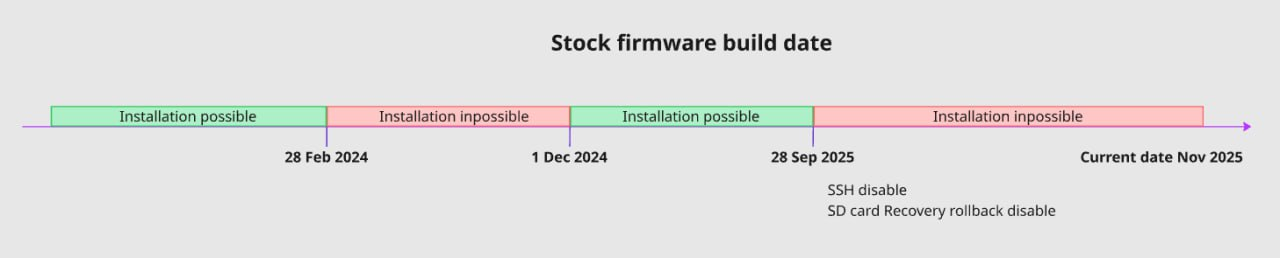
Which firmware versions VNISH can be installed on:**
- February 2024 and earlier.
- December 2024 and later.
Which firmware versions VNISH CANNOT be installed on:**
- March–November 2024 inclusive.
- September 2025 and later.
Control boards based on CVitek have a specific memory handling algorithm:
- Revert to stock: During a regular reboot, the device may automatically revert to factory firmware.
- Phoenix Service: For stable Vnish operation on such boards, it is required to run the background Phoenix-scanner service (or rescan via Toolkit), which automatically restores the custom firmware.
Factory Bitmain firmware (released after March 2024) often includes protection mechanisms: disabled SSH and blocked third-party firmware installation.
- Unlock tools: Special Recovery/Unlock SD images are used to bypass protections, “downgrade,” or unlock the control board for subsequent Vnish installation.
- Risks: Firmware released from September 2025 onward may be completely incompatible with current unlock methods.
Board definition
Vnish releases dedicated builds for each architecture. An incorrect board type selection may result in installation failure or incorrect device operation.
Hashrate
The widget displays the key performance metric of your mining hardware, allowing you to monitor efficiency and compare actual output with expected performance.